I have spent an honestly unhealthy amount of time programming with AI, and at this point, I feel like I’ve learned enough to finally sit down and share everything with you.
We’re talking hundreds of hours… testing things, breaking things, fixing things, trying again, failing again, and repeating that cycle over and over. And yeah, that also means not going outside, not touching grass, and slowly turning into a creature that only communicates with AI.
But because of that, I think I’ve finally reached a point where I can get consistently good results with AI when it comes to programming.
And the reason I’m making this is simple. A lot of people right now are confused. Some people are saying AI is incredible and completely changed how they work. Other people are saying it’s useless and just gives bad code. And after all this time, I can confidently say… both sides are kind of right. It really depends on how you use it.
Now, I’m still learning. I don’t have everything figured out yet. But I’ve learned enough that I feel like sharing this will genuinely save you a lot of time and frustration.
So, knowing all of that, let’s get into the first tip.
Tip number one: Learn how to program first
Yes. I know. This is obvious. Painfully obvious, but I’m still going to say it because apparently… it needs to be said.
If you want AI to actually be useful for programming, you need to know how to program. This isn’t some hot take. This isn’t controversial. It’s just how things work right now.
AI, at its current stage, is basically a multiplier. Not a massive one, but still a multiplier. It takes what you already know and makes you faster, more efficient, and sometimes a bit lazier in a good way.
But if you don’t understand what you’re doing, AI isn’t going to magically fix that. You can’t just outsource your thinking to AI if you don’t have that foundation in the first place. And I know that might sound harsh, but it’s just the reality. If you don’t know what good code looks like, you won’t know when AI gives you bad code. And trust me… it will give you bad code.
Tip number two: Be as specific as humanly possible
This is probably the biggest mistake I see people make.
Most people are just not specific enough when they prompt AI. And because of that, they get vague, messy, or straight-up broken results.
And honestly, when you think about it, this makes sense. Programmers are not exactly famous for their communication skills. But now, suddenly, communication matters a lot more. Because AI is only as good as the context you give it.
So I decided to test this in a very simple way. I told AI to build a Google Docs clone… three different times. Each time, I increased the level of detail in the prompt to see how it would affect the results.
And I used JetBrains’ AI assistant, Juny, for this because it actually has some safeguards that make this experiment more interesting.
Level one: The “just do it” prompt
I literally just said:
“Build Google Docs.”
That’s it. No details. No explanation. Nothing.
Now, if AI could actually build a solid version of Google Docs from just that… we’d all be in trouble. That would basically mean developers are done.
But yeah… that’s not what happened. Instead, Juny actually stopped and asked for more information. And honestly, that impressed me. That’s exactly how a real developer would respond if you gave them zero context.
Most AI tools would just assume everything and throw random code at you. So seeing it refuse to proceed was actually a good sign. Because honestly… no output is better than bad output.
Level two: The average prompt
Now I added more details. Not super technical, but more descriptive. This is probably how most people use AI. And I’m being generous here. Most people don’t even give this much detail.
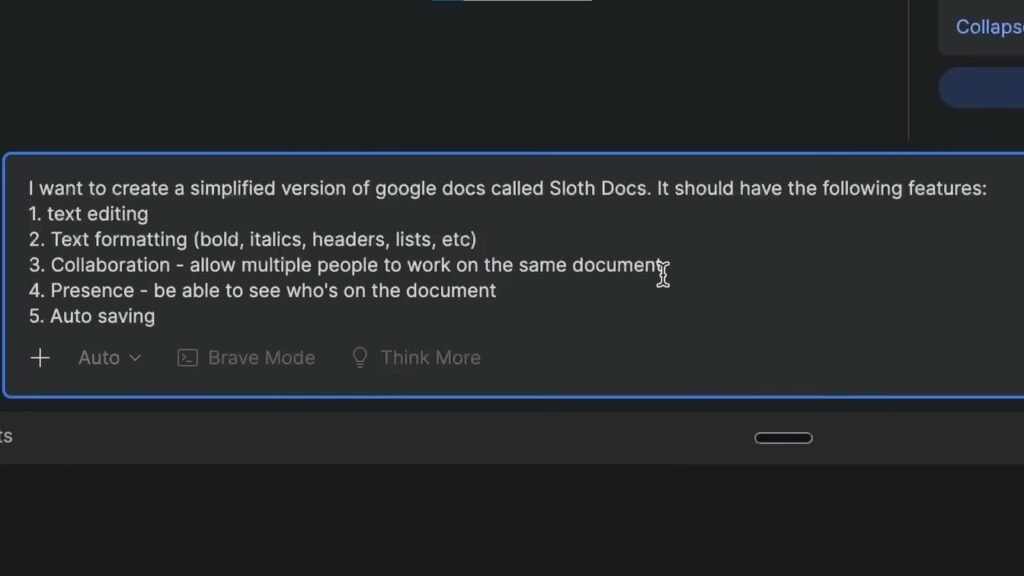
This time, Juny actually started building something. It created a structure, planned things out, and attempted to implement features.
But the result?
It didn’t run properly at first. There were errors. No styling. It looked like raw HTML exploded on my screen. Now, after I fixed it manually, it actually had most of the features I asked for. So it wasn’t completely useless. But it was messy.
And the reason is simple. I didn’t give it enough technical context.
So it had to guess everything:
- What tech stack to use
- How to structure the app
- How to handle real-time features
- How to style the UI
And when AI has to guess… you get what I like to call catfish code. It looks good at first glance. But when you actually look closer? Yeah… not so great.
Level three: The ideal prompt
Now this is where things get interesting.
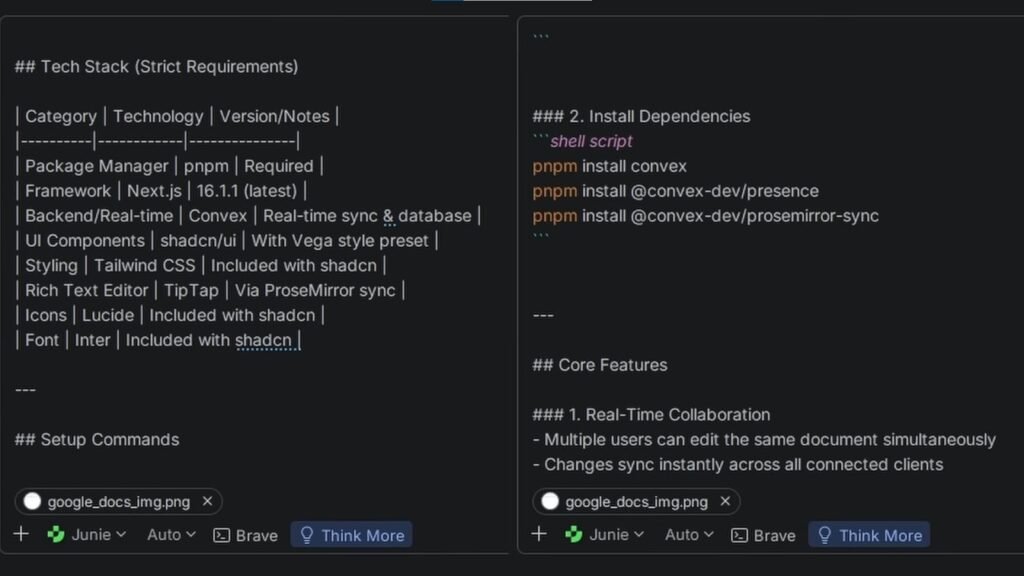
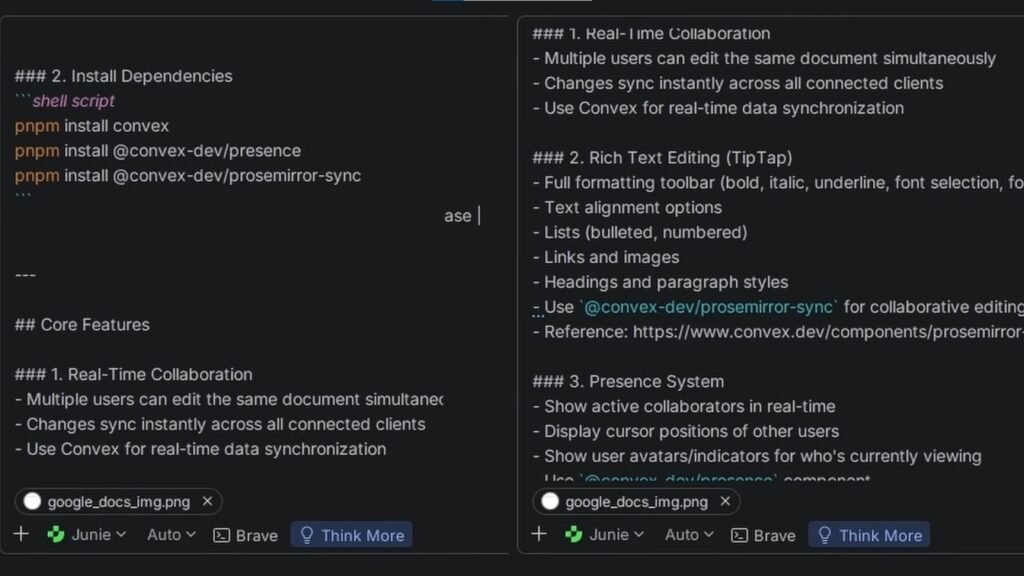
For this version, I gave it everything:
Exact tech stack
Clear instructions
Terminal commands
Documentation
Even screenshots for design
Basically, I treated it like I was explaining the project to another developer.
And the result?
It worked on the first try.
No errors. Features were there. Styling was decent. And the code itself? Pretty solid. It actually looked like something I would write. And that makes sense, because I gave it the same resources and context that I would use.
What this actually means
The difference between AI being useless and AI being amazing… might not be the AI.
It might be you. More specifically, how well you can explain what you want.
Tip number three: Break everything down
Even with a great prompt, I still ran into issues. And the reason was simple. I was asking AI to do too much at once.
A lot of people say AI is good at small tasks but struggles with big, complex ones. And instead of fighting that… you should use it to your advantage.
Break your problem into smaller pieces. If you can’t break it down, then you probably don’t understand the problem well enough yet.
And this isn’t even an AI-specific trick. This is just fundamental engineering. The only difference now is that instead of writing all the code yourself, you can let AI handle that part.Personally? I’d rather spend 10 minutes thinking and let AI do the typing than spend an hour doing both.
Tip number four: Tell AI what NOT to do
This one is surprisingly powerful. Most people focus only on telling AI what they want. But telling it what you don’t want is just as important.
Here’s a simple structure that works really well:
Clearly describe the task
Provide context (docs, files, images)
Add a “do not” section
When I used this structure to add a commenting feature (like Google Docs), the results were honestly really impressive. It followed instructions way more accurately and didn’t mess with parts of the project it wasn’t supposed to touch.
Tip number five: Make AI remember things
If your tool supports it, use memory files.
Things like:
guidelines.md
agent.md
These files should include:
Project overview
Tech stack
Commands
Rules
Basically, anything AI should always keep in mind. You can write it yourself… or just have AI generate it for you. Again, lazy wins.
Tip number six: Use tools (MCPs)
MCP stands for Model Context Protocol.
It sounds complicated, but it’s really just tools that give AI more capabilities.
Some of my favorites:
Context7 → fetches documentation automatically
Next.js tools → gives AI insight into your app
Chrome DevTools → lets AI analyze performance and errors
Find tools that match your workflow. It makes a huge difference.
Tip number seven: Always verify the code
Never trust AI blindly. Always give it a way to prove that the code works:
- Tests
- Running the app
- CLI checks
- CI/CD
You can even have AI generate these for you… just make sure you double-check them.
Finally
After spending all this time with AI, I’ve noticed something very clear.
The developers who benefit the most from AI… are the ones who already have good habits.
Everything I talked about:
Being specific
Breaking down problems
Thinking through solutions
Testing your code
These were always important. AI doesn’t replace those skills. It amplifies them. And if you have bad habits? It’ll amplify those too.