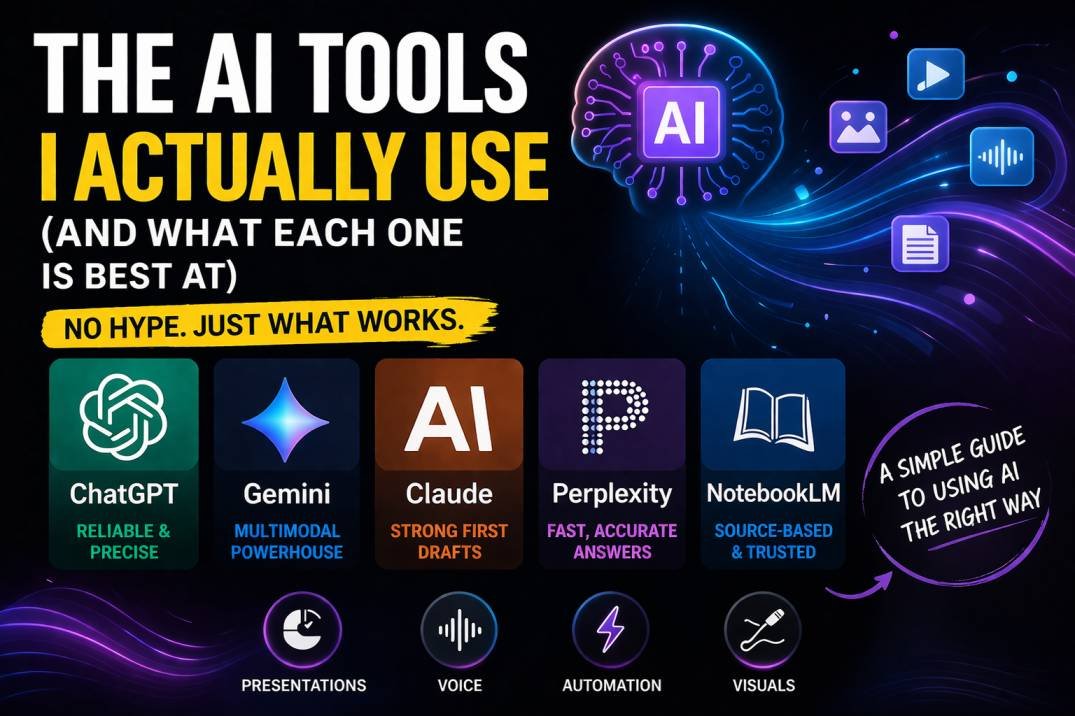
I use around 10 different AI tools for most of my work. Not because I like collecting tools, but because each one is genuinely better at something specific.
The problem is figuring that out takes time. A lot of time. You don’t really understand what a tool is best at until you’ve used it enough to see where it shines… and where it quietly fails.
So instead of you going through that same trial and error, here’s a simple breakdown of what each tool does better than the rest and when you should actually use it.
I like to group them into categories. In this article, we’ll focus on two of them:
- Everyday AI (your main chatbots)
- Specialist AI (tools built for very specific jobs)
Everyday AI: They’re Not As Similar As You Think
At first glance, tools like ChatGPT, Gemini, and Claude feel interchangeable, they’re not.
They each have a very clear strength, and once you notice it, you can’t unsee it.
ChatGPT – The Most Reliable When It Matters
If I had to describe ChatGPT in one word, it would be reliable.
Not necessarily smarter than the others, but way more consistent when you give it complex instructions.
Give it a long checklist, and it will go through every single step. No shortcuts. No guessing. No “I’ll just skip this part.”
Other models sometimes do that. They understand the task, but they cut corners or ignore smaller details.
ChatGPT doesn’t.
You can actually test this yourself. Ask different models to optimize a prompt for themselves. ChatGPT usually gives you a much longer and more structured version because it knows it can handle that level of detail.
I’ve tried this with things like hiring rubrics or multi-step workflows. ChatGPT delivered everything I asked for. Other tools looked fine at first… until I compared them to the original instructions and noticed missing pieces.
Even something simple like telling a model to search the web shows the difference. ChatGPT does it consistently. Others sometimes just… don’t.
That’s really its core strength.
If your task has a lot of moving parts and missing one detail breaks everything, start with ChatGPT.
Gemini – The King of Mixed Content
Where ChatGPT is about precision, Gemini is all about handling different types of content at once.
Text, images, audio, video… Gemini is built to deal with all of it together.
And that’s a bigger deal than it sounds.
Most tools can technically work with these formats, but they rely on indirect methods. Gemini handles them natively, which makes it way more effective when things get messy.
Let’s say you just finished a meeting and you have:
- A video recording
- A slide deck
- A photo of a whiteboard
With Gemini, you can upload everything and ask for a summary, key decisions, and even a follow-up email.
All in one go, that’s something the other tools struggle with.
Another example I use a lot is recording myself doing a task, uploading the video, and asking Gemini to turn it into a clean step-by-step SOP. It takes something chaotic and turns it into something usable.
It also has a massive context window, which basically means it can handle very large inputs without breaking.
The trade-off is that its reasoning can sometimes feel slightly behind ChatGPT. But if your task involves large files or mixed media, Gemini is easily the better choice.
If your workflow includes video, audio, or big messy inputs, use Gemini.
Claude – The Best First Draft You’ll Get
Claude’s strength is simple: its first attempt is usually really good. Not just decent. Actually close to finished. This shows up the most in two areas.
1- Coding
Even when other models score higher in benchmarks, Claude still stands out when it comes to writing working code on the first try. I’ve seen this firsthand.
I once needed to export conversations from a platform that supposedly required a developer. I described the problem, and Claude gave me clear steps and a script that worked immediately.
I don’t code. I didn’t even know the language it used, but it worked, and that’s the difference.
2- Writing and Style
Claude is also really good at writing in a natural, human tone.
If you give it examples of your work, it can match your style surprisingly well. Whether it’s scripts, emails, or reports, it usually needs fewer edits compared to other tools.
It just “gets” the tone faster.
If you want something that’s already polished on the first try, especially code or writing, use Claude.
How I Actually Use These Together
I don’t pick one tool and stick to it. I combine them.
- ChatGPT or Gemini at the start for ideas, research, and structure
- Claude at the end to polish everything into something publish-ready
That simple workflow covers most of what I do.
Also, quick note on tools like Grok. Its main advantage is real-time access to Twitter/X data. That’s useful if you care about breaking news.
I don’t, so I don’t use it, and that’s an important point.
Don’t use tools just because they exist. Use them because they solve a problem you actually have.
Specialist AI: Tools That Do One Thing Really Well
Now let’s talk about tools that aren’t trying to do everything, they’re built for one job and they do it extremely well.
Perplexity – Fast, Accurate Answers
Perplexity isn’t trying to replace chatbots. It’s trying to replace search, that’s the difference.
General AI tools help you think, write, and brainstorm. Perplexity helps you find information quickly and accurately.
If I’m planning something creative, like a trip, I’ll use ChatGPT. But if I just need a quick, reliable answer like whether a place is foreigner-friendly or a specific stat is correct, I’ll use Perplexity.
It’s fast, direct, and built for that purpose, I also use it to verify things generated by other AI tools. Think of it as a fact-checking layer, if you need a quick, reliable answer, use Perplexity.
NotebookLM – Accuracy Over Everything
NotebookLM is different from everything else on this list. It only works with the sources you give it.
That means no guessing, no pulling information from the internet, and almost no hallucinations, it’s basically a closed system.
You upload your documents, and it answers questions strictly based on those documents. I use it to double-check my work.
For example, before publishing something, I’ll upload my draft along with the source material and ask if anything contradicts the original information.
It’s really good at catching small inconsistencies that are easy to miss.
The only downside is obvious… if your sources are wrong, the output will be wrong too. If accuracy matters more than creativity and you have reliable sources, use NotebookLM.
A Few Extra Tools I Use Sometimes
- Gamma for presentations
- ElevenLabs for voice
- Zapier for automation
- Excalidraw or Napkin AI for quick visuals
They’re great, just more situational. And by the way you don’t need all of these tools. Most people are completely fine using just one and getting really good at it. But if your workflow allows it, combining tools based on their strengths makes a huge difference.
Once you understand what each one is actually good at, everything becomes faster, cleaner, and way less frustrating, and that’s really the goal.